
At last week’s VMworld, VMware presented, once more, their Mobile Virtualization Platform (MVP), now called Horizon Mobile. Besides the usual hype, there were a few things that I found somewhat annoying.
Specifically, VMware’s Raj Mallempati is quoted as saying: “What VMware is going to do is provide me a corporate phone, which is a virtual machine that is completely encrypted, completely managed and secure, and they are going to deliver that onto my device.”
Even considering that it is coming from a marketing guy, I find this statement rather dishonest. Because secure it ain’t. Not for the business. Not for the owner of the phone.
Let me explain.
Insecure for the business
As I explained in a blog last year, VMware’s hypervisor is hosted inside the phone’s native Android OS kernel (which is why they call it, incorrectly, a Type-2 hypervisor). What this means is that whoever owns that OS kernel owns the VMware hypervisor, and thus the virtual machine which contains the business phone. They encrypt the business phone’s data on flash, but that doesn’t provide any protection if the native Android kernel is compromised, it can simply read the keys out of memory.
Hence, if an app compromises the Android kernel, it controls the business phone, including all its data, network connections, the lot. And notice that the private phone keeps functioning as normal, meaning the owner is free to install and run any arbitrary Android app. With the Android kernel comprising about a million of lines of code, it can be expected to contain about 10,000 bugs. How many of the 100,000+ Android apps trigger an exploit? Probably plenty. In fact, this is the primary reason businesses don’t like company-provided handsets to be open, they fear security to be compromised.
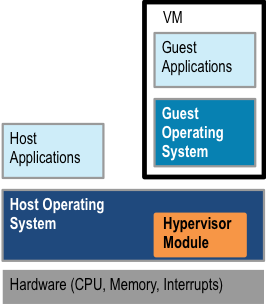
Hybrid hypervisor
Insecure for the owner
But the setup isn’t secure for the phone’s owner either. It would be if VMware used a proper Type-2 hypervisor, as that would be completely untrusted from the native Android kernel’s point of view. However, as I explained in another blog last year, the MVP setup is actually neither a Type-1 nor a Type-2, but a hybrid hypervisor. It is hosted inside the host OS, not on top of it. (They wouldn’t be able to achieve acceptable performance with a Type-2.)
What this means is that VMware essentially installs a rootkit into your Android kernel, which re-directs the exception vectors to their hypervisor module. Meaning they take over your phone. Effectively, your phone is now “owned” by whoever controls the hypervisor. Which isn’t you, the owner, it’s VMware or the OEM or the network provider or your employer (or maybe all of them). All your private data is at their mercy.
And VMware go on to say that they combine this with device management software, so they can remotely wipe the phone without touching it. Only the business phone, of course. Really? Are they going to cleanly un-install the rootkit? If you just got fired, would you trust your former company with all your private data? In fact, would you trust your company with all your private data on the phone even while you’re still working for them?
Summary: It Ain’t Secure!
Not secure for the company, not secure for the phone owner. Take my Advanced OS class, guys!
Recently I had a look at what has become of VMware’s MVP and explained the security shortcomings of the Type-2 hypervisor design. Today I’m looking at VWware’s approach in more detail, and explain why it is in fact not a real Type-2 hypervisor, and what this implies.
Type-2 hypervisors are known for poor performance. The reason I had explained in detail a while back, I’ll summarise them here (refer to the earlier blog for more details).
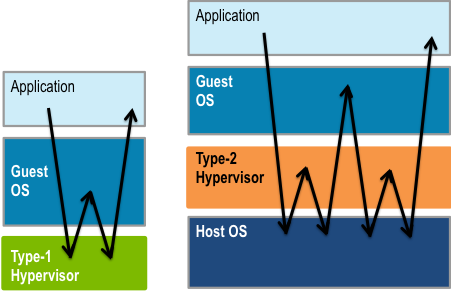
Virtualization mechanics in Type-1 and -2 hypervisors
A system call performed by an application is a privileged operation which is intercepted by the hypervisor, which (after deciding that this is an operation which should be handled by the guest) forwards it to the guest OS. The return to user mode from the guest takes a similar detour through the hypervisor, as indicated in the left part of the diagram.
In the case of a Type-1 hypervisor, this results in a total of four mode switches and two context switches. However, in the case of a Type-2 hypervisor, the system call is trapped by the host OS, which delivers it to the hypervisor, and a return from the hypervisor to either the guest or the app similarly takes a detour via the host. All up, the number of mode switches and context switches is doubled, as indicated in the right part of the diagram. Further cost arises from the fact that while a Type-1 hypervisor (such as OKL4) is highly optimised for this trampolining, the host OS generally isn’t. In reality, the overhead of doing a simple system call is in the Type-2 case not just double that of the Type-1, but closer to an order of magnitude higher. This is why virtualization with a Type-2 hypervisor is generally slow. Note that ARM’s forthcoming architecture extensions to support virtualization (I’ll discuss them in a future blog) help to reduce the overheads of a Type-1 hypervisor, but do little to help a Type-2.
VMware understands this, and has taken a different approach in MVP, which I’ll explain now.
Fundamentally, the high cost of Type-2 virtualization stems from the fact that the hypervisor effectively consists of two parts, the host OS and the hypervisor proper, that each (logical) hypervisor invocation bounces twice between those layers, and that the host mechanisms used for this bouncing are inefficient. So, what VMware does in MVP is to merge the hypervsior back in with the host.
Hybrid hypervisor
This is done by loading a MVP module (called “MVPkm”) into the host OS kernel, as shown in the diagram to the right. (They discuss this for Android, it is not clear whether they plan to support other hosts, such as Windows or Symbian. If they do, they’ll have to redo the kernel module for each host.) The MVP module effectively hijacks the host, by re-writing the exception vectors, so it obtains control whenever the guest kernel is entered. (Note: this is exactly what a piece of malware would do.) The process turns the host kernel into a hypervisor.
The result is not really a Type-2 hypervisor any more, as it actually runs native, not on top of a host OS (but inside) and has direct control over physical resources (rather than the virtualized resources provided to it by the host). However, it it isn’t a Type-1 hypervisor either, as it does not have exclusive control over the hardware, this is shared with the rest of the host, and any code inside the host kernel can interfere with the operation of the hypervisor module.
So, if this hypervisor is neither a Type-2 nor a Type-1, what is it? I call it a hybrid hypervisor, as it is somewhat of a blend of the two basic types. A better-known representative of the hybrid hypervisor type is the widely-used KVM (often falsely referred to as a Type-2 hypervisor). It operates very similarly, although KVM is dependent on virtualizaiton extensions to the architecture (MVP is not, but can make use of them).
The hybrid hypervisor can achieve similar performance as a Type-1 hypervisor, so this scheme seems pretty neat at first glance. The problem is that this performance is bought at a heavy price.
The one advantage a Type-2 hypervisor has over a Type-1 is that it can be easily installed: for the host OS it’s just another app, and it is installed just like an app, without requiring any special privileges.
This advantage is lost with the hybrid approach. It requires inserting a kernel module into the host OS, which is a highly security-critical operation (after all, it is the same as installing a root kit into the kernel!) As such it requires special privileges. On a mobile phone it requires cooperation with the device vendor or network operator, as they try very hard to prevent the unauthorised insertion of malware-like code into the OS!
While losing the ease-of-install advantage of the Type-2 to buy Type-1-like performance, the hybrid hypervisor inherits all the other drawbacks of the Type-2 hypervisor, especially the huge size of the trusted computing base. Everything in the host OS (all of a million or so lines of code!) needs to be trusted, a huge attack surface. So, while MVP is a hybrid hypervisor rather than a real Type-2, everything about the drawbacks of VMware’s approach I discussed in the earlier blog and its successor remains valid!
In summary, the hybrid approach taken with MVP has no discernible advantage over a lightweight, high-performance Type-1 hypervisor such as OKL4. MVP still requires manufacturer/MNO cooperation to install (unlike a real Type-2). It can, in theory, reach the performance of OKL4, although I’ll believe that when I see it, given that OKL4’s performance is so much better than anything else I’ve seen. But the fundamental weakness of the hybrid approach, which it shares with proper Type-2 hypervisors, is that it adds nothing to security of the guest apps, they are every bit as exposed as if they were running directly on the host. Which begs the question: Why bother?
Speaking of attacks, if you think carefully about it, you realise that MVP might very well increase the exposure of handsets to malware. Put yourselves in the shoes of a blackhat and think about how to get a rootkit onto a handset. If you know that a handset is provisioned to have MVP loaded on it, you know that it has provision for loading the MVP kernel module. It might well be that the easiest way to crack the system is to write a rootkit module which masquerades as MVPkm. I’ll sure stay away from such phones!
In a future blog I will investigate how each type of hypervisor does (or doesn’t) support the various use cases for mobile virtualization. Stay tuned, and drop me a line if you have questions.
Last week I talked about the backwards step VMware is taking by implementing their long-overdue mobile virtualization platform (MVP) as a Type-2 hypervisor. In the meantime, an insightful blog (which liberally quotes from my blog, although without attribution) talks about their use of encryption to try to protect user (actually, enterprise) data. I’ll explain here why this is just window-dressing, providing an appearance of security rather than the real thing.
VMware say they encrypt the guest’s data on flash and also use an encrypted VPN tunnel to connect to the enterprise network. Surely, this will protect the data from attacks?

Type-1 and Type-2 hypervisors and system structure
Surely not. This is akin to thinking that the data on your Windows laptop is safe from rootkits because the disk is encrypted. It ain’t. Where encrypting the disk helps is if you lose your laptop and someone finds/steals it and breaks into it. If your OS gets infected by malware, it helps zilch. ‘Cause in order to be processed, the data is loaded into memory and decrypted. And there it is fully accessible by the OS, and if that OS is infected, there’s no way to stop the malware from seeing (and leaking) your data.
Same story on the phone with the Type-2 hypervisor. The hypervisor can encrypt the guest’s data until the cows come home, that doesn’t protect it from malware infecting the hypervisor or the host OS underneath. If the host gets cracked, the hypervsior gets cracked. If the hypervisor gets cracked, you lose. No way around this fundamental truth. And the inconvenient bit of the truth is that the host+Type-2 presents a huge attack surface. While for a well-designed Type-1 hypervisor, such as the OKL4 Microvisor, that attack surface is tiny, about two orders of magnitude smaller. Take your pick!
So, what is an MVP-style solution good for? I’ll look at this later, but first need to take a more in-depth (and rather technical) look at VMware’s approach. Stay tuned!
VMware has finally lifted the lid on their long-promised mobile virtualization platform (MVP). And, surprise, it’s a Type-2 hypervisor! This is a bit of a let-down, and has some interesting implications on what MVP can (or rather cannot) do, which I’m going to explore in a few blogs.
First a bit of background. Observers of the mobile virtualization space will remember that about two years ago, VMware, better known for server and desktop virtualization products, bought our then competitor Trango. At the time they promised MVP-based products “should arrive in around 12 to 18 months“. That’s phones with MVP on it. Almost 24 months later, there isn’t even a product announcement for MVP. It’s been a bit like waiting for Godot…
In the meantime, the OKL4 Microvisor has been around for yonks. It’s available, it’s benchmarkable, it’s being deployed—it’s real. And, as befits something with “L4” in the name, it defines the state of the art of hypervisors for embedded systems.
Well, at last (least?) VMware presented their vision, accompanied by a demo, at a BOF at last week’s OSDI conference in Vancouver. Not exactly a high-profile announcement. And it’s a Type-2 hypervisor!
I’ve discussed Type-1 vs Type-2 in a blog a year ago, and another one a few months earlier, and will probably explore this topic a bit more in a future blog. For now I’ll focus on what VMware is trying to sell, and why it doesn’t actually doesn’t solve the problem they claim they are addressing. Further technical discussion will look at why they taking this particular stance. (Hint: If all you’ve got is a hammer, everything looks like a nail. Even an egg…)
Hypervisors (also called virtual machine monitors) are designed to provide multiple virtual machines which can each run an OS with all of its apps. The fundamental difference between a Type-1 hypervisor (such as OKL4) and a Type-2 is that the former runs on bare metal, between the hardware and the operating system(s). In contrast, a Type-2 hypervisor runs on top of an OS (which is why it’s also called a “hosted” hypervisor).
That difference is much more significant than it may seem. It implies a completely different relationship between the hypervisor and the various operating systems. With Type-1, the hypervisor is master, it controls the OSes (called “guests”). With Type-2, the master is an OS (the one which hosts the hypervisor), it controls the hypervisor, which can only control the other OSes. Keep this in mind.
So, what problems is VMware (pretending) to solve with their Type-2 hypervisor? The main use case they are highlighting is BYOD, “bring your own device”. (Yes, they adopted the terminology we introduced 18 Months ago—good on them!)
The motivation for BYOD is that smartphones have business as well as private use. People like to control their private phones: They want to decide on the type and model, and they want to install their choice of apps. In contrast, companies like control over the phones used for business: They want to decide the model (ideally a single one for everybody) and what software runs on them. This forces an increasing number of people to carry two phones, business and private.
The idea of BYOD is that a single phone can serve both purposes: a person buys a phone of their choice, takes it to their company’s IT dudes, and they install a virtual business phone on the BYOD handset. Sounds great, doesn’t it?
The devil is in the detail, and it’s those details which make MVP a non-solution.
Why do companies want control over the phone? There’s only one reason: security. The whole point of issuing smartphones to employees is to keep them linked into the enterprise IT infrastructure while they are on the move. Traditionally this is all about email, address books and calendars, but increasingly it is a much deeper integration, enabling the phone to access employee records, sales databases, engineering designs—anything you’d access from your computer screen in the office.
So, the bottom line is that companies are worried about the security and integrity of their data when accessed via the mobile device (phone, tablet or whatever it might be). They are worried that accessing this critical data from an uncontrolled phone puts the critical enterprise information at risk. And they are right: phones do get infected by malware, and with each application installed, the risk of infection increases. This is the core challenge BYOD must address.
Surely, VMware understands this? Maybe they do, but if so, why do they offer solution which doesn’t cut the mustard?
The reason I say this is that the BYOD model VMware is propagating does nothing to solve this fundamental security issue, while OKL4 does.
Type-1 and Type-2 hypervisors and system structure
This is illustrated in the figures at the left. With OKL4, the (Type-1) hypervisor is in control of all hardware. It isolates the VMs and their OSes from each other. If the user gets their private OS infected, that’s tough for them, but the infection cannot spread across VMs to the business environment. In order to subvert this, the attacker either has to have already subverted some of the enterprise IT infrastructure (thus coming in from the business side into the business OS) or has to attack the hypervisor from the private VM. But the hypervisor has an extremely small attack surface! The hypervisor is very small (about 10,000 lines of code). Technically speaking, the business VM has a small trusted computing base (TCB).
In VMware’s Type-2 model, it’s quite different. The business environment is controlled by the hypervisor, which is controlled by the host OS (the one that comes with the BYOD phone). If this gets cracked, as it inevitably will be, then it’s trivial to crack the hypervisor, and then you control the business OS! The reason this is easy to crack is that in this setup, the business OS has a huge TCB. It includes the complete private OS, which likely comprises upwards of 1,000,000 lines of code—two orders of magnitude more than OKL4!
Now remember where we’re coming from. The original motivation for BYOD was that companies don’t trust people’s private phones with critical business data, because these phones get cracked, which would compromise the business data. The idea of BYOD, as promoted by OK Labs, is to provide a virtual business phone on the private handset which is just as secure as if it was a physically separate handset.
If you followed my argumentation above, you’ll see that VMware’s solution is no bit more secure than allowing people to access the business data through their normal private phones, without the detour via a hypervisor. In other words, MVP adds nothing to security. So why would you pay for it then? You might as well cut out the middle man and allow people to access the enterprise IT system from their unmodified private phones. Security-wise, there is no difference whatsoever.
At OK Labs, we believe that security isn’t something that’s solved with PR. It requires a technically-sound approach. It requires a minimal TCB. It requires OKL4.
Stay tuned for a more in-depth look at these issues.
My Evoke white paper has triggered an unusual amount of comments, all to do with the brief discussion of fast context-switching and the graph reproduced here.
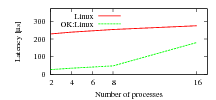
Native Linux vs OK:Linux context-switching cost on ARM9 (smaller is better)
However, the unusually large number of comments and queries tells me that I should provide a bit more explanation. Here we go (although it can really all be found in the referenced publications too…)
The graph shows that context-switching costs in OK:Linux are significantly lower than in native Linux on an ARM9 platform, but the gap narrows as the number of processes exceeds 8, and the graph ends at 16. And I said that “the improvement is particularly large if the number of presently active processes is small—a typical situation for mobile phones.”
First, I have to admit I was a bit sloppy when talking about “active processes”, many people (not unreasonably) interpreted to refer to the total number of non-zombie processes in the system. I should have used the technically accurate formulation “process working set”, but didn’t want to get too technical. Clearly, you should never be sloppy…
What does the “process working set” mean? The working set is a technical term in operating systems referring to the subset of a particular resource that is in active use over a certain (small) window of time. It can be applied to main memory, cache memory, processes or others. In this case the “process working set” is the set of processes which execute on the CPU in a particular, small, time window.
How small is “small”? That depends (and I remember that as a student I was frustrated that the prof didn’t provide a good answer to that question). Given the numbers we are talking about here (order of 10 processes, and order of 0.25ms overhead in native Linux) it makes sense to look at a few miliseconds. Given that the default time slice of Linux is 10ms, let’s say we’re looking at a window of a single time slice.
So, how big is the process working set in a typical (embedded) Linux system? Small. Remember, as long as a running process doesn’t block (waiting on a resource, such as I/O or a lock) or is preempted (as a result of an interrupt) it will execute for its full time slice. The working set size in this case is one. On my Linux laptop there are at any time at least 200 processes, but almost all of those are blocked waiting for some event (such as standard input or a mouse click). The number of processes running during a time slice will be small, I’d say it’s less than ten almost all the time. On a phone it’s likely to be less than on my laptop. Phones are becoming more and more like laptops, but they really aren’t doing as much as a typical laptop with dozens of windows and all those background processes our highly-bloated desktop environments are running.
So, I clearly stand by my claim, disputed by some, that the process working set on a phone is typically small, and normally much less than ten. Which implies that the context-switching overhead of OK:Linux is about an order of magnitude less than that of native Linux.
What if it does get bigger occasionally? The graph ended at 16, does that mean OK:Linux cannot have more than 16 processes in the working set?
Nope, there is no such limitation. OK:Linux supports as many processes as native Linux does, no matter how many of them form the working set.
Those of you who have read the FASS papers (referenced by the white paper) will know that our fast context switching is based on the use of a feature of the ARM9 MMU called “domains”, and there are only 16 of them (and one is reserved for kernel use, so there are 15 available). So, what if we have more than 15 processes? Well, we do what any decent OS does if it runs out of a resource: it recycles. So, we use “domain preemption” to share a limited number of domains among a greater number of processes. That has a cost, but it’s still better than not using domains at all, as the graph also shows: With 16 processes the latency is still only about 2/3 of that of native Linux. Once the process working set size gets really large, OK:Linux overheads end up a bit higher than those of native Linux. But I’ve never seen a mobile system with such a large process working set (remember, my busy laptop doesn’t even get there, how would a phone?)
But, of course, you don’t have to believe me, you can see for yourself. Check out the Evoke and its snappy UI, and tell me whether you’ve seen a phone with similar functionality, running on an ARM9 processor (even a dedicated one) that does better!
This is the fourth (and hopefully last) installment of my dissection of a paper our competitors at VirtualLogix had written and presented at IEEE CCNC last January. The paper compares what the authors call the “hypervisor” and “micro-kernel” approaches to virtualization.
In the previous blogs I explained how their flawed benchmarking approach makes their results worthless, that their idea of a microkernel represents a 1980’s view that has been superseded more than 15 years ago and gave specific examples of this. Now I’ll look at what they say about virtualisation and hypervisors, which, as it turns out is similarly non-sensical.
Their explanation of virtualization approaches starts off with somewhat amusing statements, when they say that for pure virtualization (i.e. without modifying the guest OS) you either need hardware support that’s only available on the latest processors or need use binary translation. That will come as a surprise to the folks at IBM who’ve done pure virtualization without binary translation for 40+ years…
What they apparently mean (but fail to say) is that many recent processors were not trap-and-emulate virtualizable and therefore require either of the above.
Much more concerning is that they present OKL4 as a Type-II (aka “hosted”) hypervisor — these are generally reputed to perform poorly compared to Type-I (aka. bare-metal) hypervisors, so the reader is at this stage primed to expect poor performance from OKL4.
This is quite misleading. A Type-II hypervisor runs as an application program on top of a full-blown OS. The virtual machine runs on top of that, and the Type-II hypervisor intercepts the VM’s attempts to perform privileged operations — typically by using the host OS’s debugging API — an expensive process. A Type-I hypervisor, in contrast, runs on the bare hardware.
A critical difference is in the number of mode switches and context switches required to virtualise an operation performed by the virtual machine. Say the app running in the virtual machine (let’s call it the guest app) is executing a system call, which causes a traps into privileged mode. This is shown in the figure below.
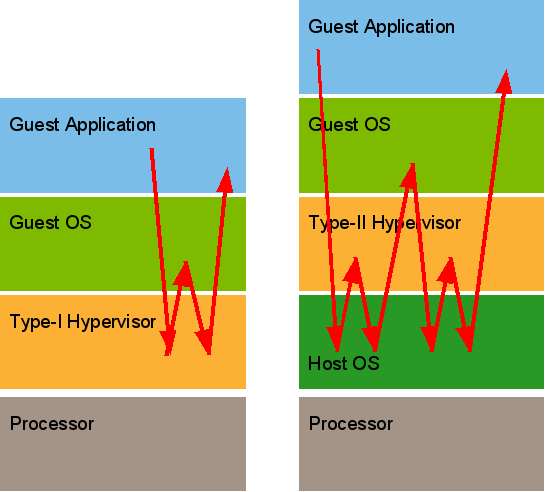
Type-I vs Type-II hypervisors
In the Type-I case, the syscall invokes the hypervisor. The hypervisor examines the trap cause, finds that it was a syscall meant for the guest, and invokes the guest’s trap handler. The guest delivers the service and executes a return-from-exception instruction (in the case of pure virtualization) or an explicit hypercall (in the case of para-virtualization). In each case, the hypervisor is entered again to restore the guest app’s state. In total this requires four mode switches (app-hypervisor-guest-hypervisor-app) and two switches of addressing context (app-guest-app).
In the Type-II case, the trap invokes the host OS. It notices that a “debugger” (the hypervisor) has registered a callback for syscalls, so it invokes the hypervisor. This one knows that this is an event for the guest OS, so it asks the host OS (via a syscall) to transfer control to the guest. The guest delivers the service and attempts to return to its app. This again traps into the host, which invokes the hypervisor, which invokes the host to return to the app. In total, 8 mode switches (app-host-hypervisor-host-guest-host-hypervisor-host-app) and 4 context switches (app-hypervisor-guest-hypervisor-app). Obviously much more expensive.
So, how does that compare to virtualization using OKL4? This is what happens if an OK Linux app performs a system call: The app causes a trap, which invokes the OKL4 kernel. It notices that this is not a valid system call, so it considers it an exception, which is handled by sending an exception IPC to the app’s exception handler thread. This happens to be the “syscall thread” in the OKL Linux server. OK Linux delivers the service, and invokes the OKL4 kernel to return to the app. In total, 4 mode switches (app-OKL4-Linux-OKL4-app) and 2 context switches (app-Linux-app).
Does this sound like a Type-II hypervisor? You’ll note that the expensive operations which determine the virtualization overheads (mode changes and context switches) are exactly those of a Type-I hypervisor. And the statement made in the paper that “the result of implementing virtualization on a micro-kernel host is a level of complexity similar to fully hosted VMs with high performance impact”? I think you’ll agree with me that this is utter nonsense.
Then there’s a truly stunning statement: “The micro-kernel is involved in every memory-context switch and the guest OS must be heavily modified to allow this.” The non-expert reader will be excused for interpreting this statement as implying that a “hypervisor” doesn’t have to be involved in every context switch. How is that possible? A context switch is clearly a privileged operation, as it changes access rights to physical memory. The hypervisor (and this is consistent with the definition given in the VirtualLogix paper) must have ultimate control over physical resources, and thus must be involved in each context switch.
Anyone who doubts this clearly doesn’t understand virtualization. So, this is an interesting statement from a virtualization provider. Folks, you really should take UNSW’s Advanced OS course! (Note that it would be possible to build hardware that knows about multiple user contexts, and can switch between them in certain situations without software interaction. But no ARM processor has such hardware.)
Finally, there’s the claim that for para-virtualizing a guest, the “microkernel approach” (read “OKL4”) requires more modifications than the “hypervisor approach” (read “VLX”). And this is supported by another apples-vs-oranges comparison: It is stated that to para-virtualize Linux 2.6.13 on a particular ARM platform for VLX required changes to 51 files and adding 40, while OK Linux “required” a new architecture tree which includes 202 new files, 108 of them ARM specific.
What they fail to mention is that this is a (well-documented) design choice of OK Linux. When para-virtualizing Linux, we chose to make the para-virtualization as independent of the processor architecture as possible. Hence we decided to introduce a new L4 architecture, and port to that one, with most processor-specifics hidden by the microkernel. Therefore the comparison made in the paper cannot be considered fair. Fairer would be to compare the sum of changes required to maintain para-virtualized Linux on several architectures.
But this isn’t the full story either. Just counting “added files” is a poor (and unscientific) metric. How big are those files? Once the first port is done, how many of them will ever need changing as Linux evolves? Without addressing those (and similar) questions, this comparison is completely meaningless.
Finally (and worst of all), the authors fail to mention another rather relevant fact. OK Linux on ARM9 processor is somewhat special: it contains support for fast context switching, the trick we use to make para-virtualized Linux do context switches 1–2 orders of magnitude faster than native Linux, without sacrificing security. Obviously, this requires some code to support (a fair bit, in fact). I’m not aware of VLX supporting this feature. So, this is apples-vs-oranges again.
Now, remember my first blog in this series. There I noted that they used an ARM11 platform for the performance comparison, and I stated that OKL4 wasn’t at the time particularly optimised on that platform, but highly optimised on ARM9. So, isn’t it interesting that for comparing code changes they actually use the ARM9 version (which requires far more extensive support code for fast context switching)? Can this really be an accident?
It’s amazing, isn’t it? Discussing what’s wrong with that paper produced almost as much text as the paper itself (and I’ve ignored plenty of minor things). And I would expect any of my students to be able to do this sort of dissection. You’ll probably understand that I think the reviewers of that paper were totally out of their depth.
In sum, that paper is utterly worthless, and almost all conclusions drawn in it are totally wrong.
 microkerneldude